

Mouse Sensor Spin-Out & Lift-Off Distance (LOD) Guide: Glass Pad Calibration & Asymmetric Cut-off Fixes
TL;DR
Sensor Spin-Out Physics: CMOS optical sensors lose tracking when surface reflectance or angular velocity exceeds illumination shutter frequency ($V_{max} > 750 \text{ IPS}$). Asymmetric Cut-Off: Calibrating separate landing thresholds (0.7mm) and lift thresholds (1.0mm) stabilizes crosshair tracking during vertical repositioning. Glasspad Surface Tracking: Low-dispersion optical lenses require surface matrix tuning to prevent micro-jitter on tempered glass.


Few hardware anomalies are as frustrating in a high-stakes clutch as a mouse sensor spin-out—the sudden, violent snapping of your crosshair into the floor or ceiling when executing an aggressive swipe. Understanding why modern optical sensors (such as the PixArt PAW3395, PAW3950, and Razer Focus Pro) lose surface correlation, calibrating Lift-Off Distance (LOD), configuring Asymmetric Cut-off, and optimizing surface matrices for tempered glass pads is essential for flawless mechanical consistency.
1. The Physics of Optical Sensor Tracking & Spin-Out
Modern gaming mice do not use mechanical balls or simple lasers; they utilize an integrated Optoelectronic System consisting of an infrared illumination LED, an optical magnification lens, a high-speed CMOS image sensor, and an onboard Digital Signal Processor (DSP):
$$\text{Surface Displacement} = f(\Delta X, \Delta Y) \quad \text{via 2D Cross-Correlation at } 15,000+\text{ FPS}$$
A sensor spins out under three distinct mechanical conditions:
- Maximum Tracking Velocity ($V_{\text{max}}$) Breach: Flagship sensors boast tracking speeds of 650 to 750 IPS (Inches Per Second), equivalent to $16.5\text{ m/s}$ to $19.0\text{ m/s}$. While human arm swipes rarely exceed $8\text{ m/s}$, tilted swipes on uneven surfaces can cause the sensor to exceed its internal acceleration threshold ($50G\text{ to }70G$), causing the DSP to drop tracking calculation frames.
- Sensor Tilt Angle Distortion: When aggressive arm aimers flick rapidly, they frequently lift the outer edge of the mouse, tilting the sensor lens beyond its focal angle ($> 5^{\circ}\text{ tilt}$). At this angle, the CMOS array receives an out-of-focus image, causing the crosshair to freeze or drop.
- Illumination Shutter Saturation: On high-gloss or micro-etched tempered glass mousepads, light from the illumination diode reflects directly back into the camera aperture, creating optical glare that washes out surface microscopic texture features.
| Sensor Model | Max IPS | Max Acceleration | Minimum Native LOD | Glass Surface Support |
|---|---|---|---|---|
| PixArt PMW3360 (Legacy) | 250 IPS | 50G | ~ 1.5 mm | No (Spins out on transparent/frosted glass) |
| PixArt PAW3395 (Standard Meta) | 650 IPS | 50G | 1.0 mm | Partial (Requires frosted/acid-etched glass) |
| PixArt PAW3950 (Flagship 2026) | 750 IPS | 70G | 0.7 mm | Yes (Native tracking on > 4mm clear/frosted glass) |
| Razer Focus Pro 35K Gen-2 | 750 IPS | 70G | 0.7 mm | Yes (Dedicated Glass Surface Mode) |
2. Lift-Off Distance (LOD) Calibration: 0.7mm vs 1.0mm vs 2.0mm
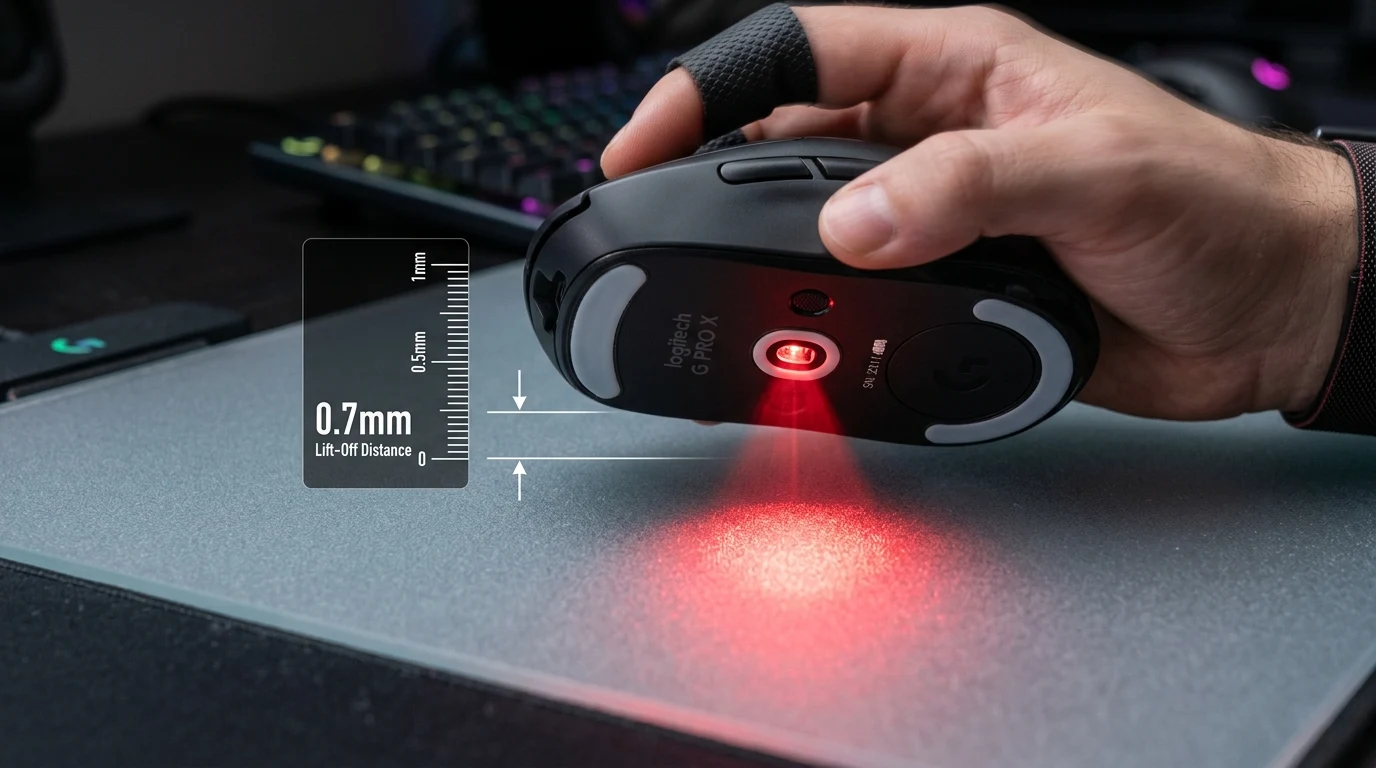
Lift-Off Distance (LOD) is the vertical distance the mouse can be raised above the pad before the sensor stops tracking:
- High LOD (1.5mm – 2.0mm+): When you lift the mouse to reposition it during a large 180-degree turn, the sensor continues tracking air movement as your hand travels back toward the center of the pad. This causes the crosshair to violently drift downward and diagonally.
- Low LOD (0.7mm – 1.0mm): Tracking cuts off almost instantaneously the moment the skates leave the mousepad, keeping your crosshair anchored exactly where you lifted off.
- Recommendation: Always select
Low (1.0mm)or0.7mmin your mouse driver software. If your mouse skates are thicker than stock (e.g., 0.8mm aftermarket sapphire or glass dots), test tracking to ensure the sensor does not cut out prematurely.
3. Asymmetric Cut-Off: Eliminating Landing Reticle Jitter
Traditional mouse firmware utilizes a single symmetric LOD threshold. However, physical biomechanics during a mouse reset are asymmetrical: lifting is a smooth deceleration, while landing is an abrupt collision. Asymmetric Cut-Off solves this by decoupling lift and landing distances:
- Lift Distance: Set to 1.0mm. This prevents tracking dropouts if your mouse briefly skips or lifts slightly during uneven speed glides across textured mousepad seams.
- Landing Distance: Set to 0.7mm. Tracking will not resume until the mouse is almost completely flush with the mousepad, eliminating the unwanted micro-flick caused by the mouse touching down at a slight angle.
4. Tempered Glass Pad Optimization (Skypad / Wallhack / Atlas)
Glass mousepads deliver near-zero static friction, but their optical characteristics require specific calibration:
- Surface Calibration Tuning: If your mouse software includes a 'Manual Surface Tuning' tool, run it directly on the clean glass surface. The sensor will calibrate its LED exposure time and CMOS gain specifically for the glass substrate's reflectance profile.
- Keep the Surface Clean: Glass pads do not absorb dust, skin oils, or pet hair like cloth pads. A single speck of lint trapped inside the sensor aperture will cause severe tracking spin-outs. Wipe down your glass pad with a microfiber cloth and 70% isopropyl alcohol daily.
- Skate Material Selection: Never use glass skates on a glass pad (glass-on-glass grinding destroys both surfaces). Always use hardened 100% virgin PTFE or UHMW-PE skates.
Test Your Sensor & Mousepad Synergy
Verify your mouse glide dynamics and calculate ideal desk dimensions:
5. Diagnostic Troubleshooting: Resolving Sensor Anomalies
- Mouse Sensor Randomly Freezes During Intense Combat: If tracking cuts out for 0.5 seconds only during rapid multi-directional flicks, your aftermarket skates are likely too thick (> 0.9mm), pushing the sensor lens beyond its maximum focal ceiling. In mouse software, raise LOD from 'Low' to 'Medium' (or 1.5mm), or install 0.6mm–0.7mm standard thickness PTFE skates.
- Crosshair Snaps Directly Downward When Resetting Mouse: This indicates an excessively high LOD (> 2.0mm). When you lift your mouse, your hand tilts slightly backward, and the sensor continues registering downward motion. Lower LOD to 1.0mm or activate Asymmetric Cut-Off.
- Persistent Sensor Spin-Out on a Brand-New Cloth Pad: Highly reflective graphic-printed cloth pads (sublimated polyester with glossy inks) can create optical glare hot spots. Test the mouse on a plain black unprinted mousepad. If spin-outs cease, the sensor firmware is struggling with the printed pad's dynamic color contrast.
- Sensor Jitter at Rest (Phantom Movement): If your crosshair moves slowly on its own while your hand is off the mouse, your desk is transmitting mechanical vibrations from case fans or subwoofer bass. Alternatively, high-DPI ripple (above 6400 DPI) or a stray hair lodged across the sensor lens is creating false optical motion.
6. Biomechanical Execution: Preventing Tilt-Induced Spin-Outs
Aggressive low-sensitivity players often tilt their mouse unconsciously during rapid reset cycles. To maintain a flat sensor plane:
- Flat Wrist Floating: Avoid planting your wrist pisiform bone hard onto the desk, which forces the mouse to tilt upward during forward swipes. Maintain a level forearm glide that keeps all four mouse skates evenly weighted against the mousepad.
- Symmetrical Ring and Pinky Pressure: Uneven grip pressure between your thumb on the left and pinky on the right will tilt the mouse shell along its roll axis. Balance your grip pressure so the mouse base remains parallel to the tracking surface throughout high-velocity flicks.
7. Verified Esports Case Studies: Tournament Sensor Reliability
| Pro Player | Tournament | Sensor Hardware | LOD Setting | Mousepad Surface |
|---|---|---|---|---|
| ZywOo (Mathieu Herbaut) | BLAST Premier CS2 | PixArt PAW3395 (Pulsar) | 1.0 mm (Low) | Dense Poron cloth pad for maximum vertical repositioning stability. |
| Aspas (Erick Santos) | VCT Champions | HERO 2 (Logitech G Pro X 2) | Low (< 1.0mm) | Artisan Zero Soft cloth pad providing zero tracking lift drift during aggressive 180° sweeps. |
| Prashant (Apex Pro) | ALGS Pro League | Razer Focus Pro 35K | Asymmetric (1.0mm Lift / 0.7mm Land) | Wallhack SP-004 glass pad with dedicated surface tracking calibration. |
8. DCPROSENS Laboratory Testing Methodology
To benchmark optical sensor tracking ceilings and LOD thresholds:
- Precision Optical Micrometer Gauge: Mice are mounted on an automated vertical micrometer stage with $0.01\text{ mm}$ step resolution to determine the exact micron height where motion reporting drops to zero.
- High-Acceleration Spin-Out Sled: A pneumatic high-speed actuator accelerates mice up to $800\text{ IPS}$ ($20.3\text{ m/s}$) and $75G$ across various competitive surfaces (Artisan Poron, Cordura 500D, and frosted tempered glass) while recording count output integrity.
- Environmental Friction Testing: Surface testing is performed across both bone-dry (25% RH) and humid (75% RH) environmental chambers to assess moisture-induced optical tracking interference.
9. Biomechanical Conditioning Protocol: Arm Elevation Control
Maintain consistent mouse reset mechanics and reduce shoulder fatigue with this recovery routine:
- Shoulder Girdle Retraction: Pull your shoulder blades backward and downward, holding for 10 seconds. This stabilizes the deltoid and trapezius muscles responsible for smooth mouse lifting.
- Sub-Millimeter Hover Drills: Practice lifting your mouse just barely enough to clear the pad without dragging skates, training your neuromuscular proprioception to minimize unnecessary vertical displacement.
Frequently Asked Questions
What causes an optical mouse sensor to 'spin out' during fast flicks?
A sensor spin-out occurs when the mouse's physical velocity exceeds the maximum tracking speed ($V_{\text{max}}$, measured in Inches Per Second / IPS) or maximum acceleration ($G$) of the optical sensor, or when the CMOS sensor camera receives inconsistent reflected light (due to dust, tilted sensor angle, or improper surface reflectance), causing the correlation algorithm to lose its coordinate tracking matrix and snap the crosshair straight into the floor or sky.
What is Lift-Off Distance (LOD) and what is the competitive standard in 2026?
Lift-Off Distance (LOD) is the vertical height at which the mouse sensor stops tracking movement when lifted off the mousepad surface. The modern competitive standard is between 0.7mm and 1.0mm (Low LOD). A low LOD ensures that when you lift and reset your mouse during large 180° sweeps, the crosshair remains completely stationary on screen without unwanted downward or diagonal drift.
How does Asymmetric Cut-Off work on modern PixArt and Razer Focus Pro sensors?
Traditional LOD uses a single threshold for both lifting and landing. Asymmetric Cut-Off allows players to configure separate distances: a slightly higher lift-off threshold (e.g., 1.0mm) to prevent accidental tracking drops during rapid gliding, and a lower landing cut-off threshold (e.g., 0.7mm) so tracking only resumes when the mouse is firmly planted back on the pad, eliminating cursor jitter during mouse resets.
Why do optical sensors behave differently on glass mousepads compared to cloth pads?
Tempered glass pads (such as Skypad/Wallhack, Superglide, or Razer Atlas) are translucent or reflective surfaces with microscopic etched acid textures. Standard optical sensors calibrated for matte fabric fibers can experience refraction or internal light reflection through the glass substrate. Modern flagship sensors (PAW3950, Focus Pro 35K) include dedicated glass-tracking algorithms that adjust infrared LED illumination exposure to maintain 100% surface tracking.
Equipamentos de Elite Recomendados
Mouses ultra-leves topo de linha recomendados pelo Treinador Dalto para máxima precisão de sensor e consistência física no seu mousepad:
Logitech G Pro X Superlight 2
O mouse mais vencedor do cenário competitivo. Shape icônico, sensor HERO 2 e switches ópticos-mecânicos híbridos.
Razer Viper V3 Pro
Rastreador preciso com polling rate sem fio nativo de 8.000 Hz e formato simétrico ergonômico moderno.
Razer DeathAdder V3 Pro
Excelente para pegadas palm ou claw que querem apoio anatômico. Sensor Focus Pro 30K de última geração.
Lamzu Atlantis OG V2 / Thorn
Mouse boutique com peso irrisório e base vazada. Pegada traseira perfeita para controle agressivo de claw grip.
🎯 Lock In Perfect 1:1 Aim & Pro Consistency
Tired of daily aim inconsistency? Calibrate your physical cm/360, scope matching, and sensor latency. Get the complete Precision Aim System (4-Part Technical Manifestos) today for only $9.00 USD!
Unlock Elite Precision ($9) ⚡Dalto Outlier
Creator, DCPROSENSDalto built DCPROSENS to help competitive FPS players convert sensitivity, calibrate DPI, and keep their aim consistent across games.
Related Guides & Articles



Disclosure: some links on this page are affiliate links. As an Amazon Associate, DCPROSENS earns from qualifying purchases at no extra cost to you.

